Buying Guide for the Best Steam Compatible Controllers
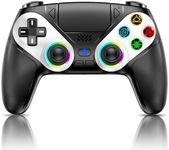
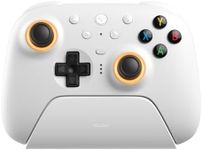
When choosing a steam-compatible controller, it's important to consider how you plan to use it, the types of games you play, and your personal preferences for comfort and functionality. A good controller can significantly enhance your gaming experience, so taking the time to understand the key specifications will help you make an informed decision. Here are the key specs to consider when selecting a steam-compatible controller and how to navigate them to find the best fit for you.CompatibilityCompatibility refers to whether the controller can work seamlessly with Steam and your gaming setup. This is crucial because not all controllers are designed to work with Steam out of the box. Look for controllers that explicitly state they are Steam-compatible. If you play on multiple platforms, you might want a controller that works with other systems like Windows, macOS, or even consoles. Ensure the controller supports the operating system you use most frequently.
ConnectivityConnectivity options include wired, wireless, and Bluetooth. Wired controllers offer a stable connection with no latency, which is ideal for competitive gaming. Wireless controllers provide more freedom of movement but may require charging or batteries. Bluetooth controllers are versatile and can connect to multiple devices, but they might have slight input lag. Choose based on your preference for mobility and the importance of a stable connection in your gaming.
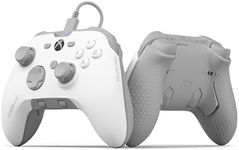
ErgonomicsErgonomics refers to how comfortable the controller is to hold and use for extended periods. This is important because a poorly designed controller can lead to discomfort or even injury. Controllers come in various shapes and sizes, so consider your hand size and grip style. Test different controllers if possible to find one that feels comfortable and natural in your hands. Look for features like textured grips and well-placed buttons.
Button LayoutThe button layout includes the arrangement and number of buttons, triggers, and joysticks. This is important for ease of use and accessibility during gameplay. Some controllers have additional buttons or customizable layouts, which can be beneficial for complex games. Consider the types of games you play; for example, fighting games might benefit from a controller with more buttons, while racing games might need precise triggers. Choose a layout that complements your gaming style.
Customization OptionsCustomization options allow you to modify the controller's settings to suit your preferences. This can include remapping buttons, adjusting sensitivity, and changing the appearance. Customization is important for creating a personalized gaming experience and improving performance. If you like to tweak settings to optimize your gameplay, look for controllers that offer extensive customization through software or physical adjustments.
Build QualityBuild quality refers to the materials and construction of the controller. A well-built controller is durable and can withstand heavy use. This is important for longevity and reliability. Controllers made from high-quality materials will feel more solid and last longer. Consider how often you play and how rough you are with your equipment. If you are a frequent gamer, investing in a controller with superior build quality is advisable.
Haptic Feedback and VibrationHaptic feedback and vibration provide tactile sensations that enhance the gaming experience by simulating in-game actions. This is important for immersion and can make games feel more realistic. Controllers with advanced haptic feedback can offer more nuanced vibrations. If you enjoy a more immersive experience, look for controllers with strong and customizable haptic feedback. If you prefer a simpler experience, a basic vibration feature might suffice.
Battery LifeBattery life is the duration a wireless controller can operate before needing a recharge. This is important for uninterrupted gaming sessions. Controllers with longer battery life are more convenient and reduce the frequency of recharging. Consider how long you typically play in one sitting. If you have long gaming sessions, look for controllers with extended battery life or quick charging capabilities.