Buying Guide for the Best Projector Under 500
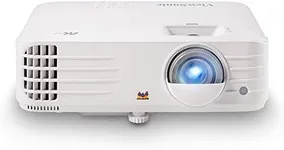
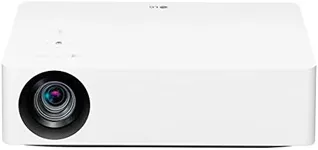
Choosing the right projector can significantly enhance your viewing experience, whether it's for home entertainment, business presentations, or educational purposes. When selecting a projector, it's important to consider several key specifications that will determine the quality and suitability of the projector for your needs. Understanding these specs will help you make an informed decision and ensure you get the best value for your money.ResolutionResolution refers to the number of pixels that make up the image projected on the screen. Higher resolution means more pixels and a clearer, more detailed image. Common resolutions include 720p (HD), 1080p (Full HD), and 4K (Ultra HD). For general home use, 1080p is usually sufficient, providing a good balance between image quality and cost. If you plan to use the projector for detailed presentations or high-definition movies, you might want to consider a higher resolution like 4K.
BrightnessBrightness is measured in lumens and indicates how bright the projected image will be. This is important because it affects how well the image can be seen in different lighting conditions. For dark rooms, a projector with 1,000 to 2,000 lumens is usually adequate. For rooms with some ambient light, look for a projector with 2,000 to 3,000 lumens. For well-lit rooms or outdoor use, you may need a projector with 3,000 lumens or more. Consider where you will be using the projector most often to determine the right brightness level for you.
Contrast RatioThe contrast ratio measures the difference between the darkest and brightest parts of an image. A higher contrast ratio means more detail in the shadows and highlights, resulting in a more vibrant and dynamic picture. For home entertainment, a contrast ratio of at least 1,000:1 is recommended, but higher ratios like 10,000:1 or more will provide even better image quality. If you plan to use the projector for movies or gaming, a higher contrast ratio will enhance your viewing experience.
Throw DistanceThrow distance is the distance between the projector and the screen. It determines how large the image will be at a given distance. Projectors are categorized into short throw, medium throw, and long throw. Short throw projectors can create a large image from a short distance, making them ideal for small rooms. Medium throw projectors are versatile and can be used in average-sized rooms. Long throw projectors are suitable for large rooms or auditoriums. Consider the size of your room and how far you can place the projector from the screen to choose the right throw distance.
Lamp LifeLamp life indicates how long the projector's lamp will last before it needs to be replaced. It is measured in hours. Longer lamp life means less frequent replacements and lower maintenance costs. Typical lamp life ranges from 2,000 to 5,000 hours, but some projectors offer lamp lives of up to 10,000 hours or more. If you plan to use the projector frequently, look for one with a longer lamp life to ensure it lasts longer and reduces the need for replacements.
ConnectivityConnectivity options determine how you can connect the projector to other devices like laptops, gaming consoles, or streaming devices. Common connectivity options include HDMI, USB, VGA, and wireless connections. HDMI is the most versatile and widely used, providing high-quality audio and video. USB ports are useful for connecting flash drives or other peripherals. VGA is an older standard but still useful for some devices. Wireless connectivity allows for easy streaming from smartphones or tablets. Consider what devices you will be connecting to the projector and ensure it has the necessary ports and connectivity options.
Keystone CorrectionKeystone correction is a feature that helps adjust the image to be perfectly rectangular, even if the projector is placed at an angle to the screen. This is important for achieving a properly aligned image without distortion. There are two types of keystone correction: vertical and horizontal. Vertical keystone correction is more common and adjusts the image up and down, while horizontal keystone correction adjusts it side to side. If you plan to place the projector off-center or at an angle, look for a projector with both vertical and horizontal keystone correction for the best image alignment.