Buying Guide for the Best Wireless Outdoor Security Cameras
Choosing a wireless outdoor security camera can feel overwhelming due to all the technical features and options available. The best approach is to start by thinking about where you want to place the cameras, what areas need coverage, and what type of monitoring you expect (for example, real-time alerts or just recorded footage). Understanding your specific needs will help you focus on the features that matter the most to you and avoid paying for extras you might not use. Always consider the environment where the camera will be installed and the potential limitations such as Wi-Fi range or exposure to the elements.Video ResolutionVideo resolution refers to the clarity of the footage your camera records. Higher resolution means you get sharper, more detailed images, which is especially helpful for identifying faces or license plates. Common resolutions are 720p (HD), 1080p (Full HD), and 4K (Ultra HD). For basic security and general monitoring, 720p may suffice, while 1080p is a standard choice for most users, offering a good balance between clarity and storage requirements. 4K provides the best detail but requires more bandwidth and storage. Think about what level of detail you need and if you want to recognize faces or details from a distance, higher resolution is helpful.
Night VisionNight vision allows the camera to record clear footage even in low light or total darkness, which is crucial for outdoor security at night. Cameras may use infrared LEDs or enhanced low-light sensors. The key thing to look for is the night vision range, usually measured in feet or meters. Short ranges are fine for patios or doorways, but if you want to cover a yard or a driveway, a longer range will be important. Consider the size of the area you'll be monitoring at night to match the night vision capacity.
Field of ViewThe field of view is the width of the area the camera can capture, measured in degrees. A wider field of view covers more area, which can reduce the number of cameras needed. Narrower angles focus on a smaller, more detailed section. Typical fields of view range from about 90° (narrow, for hallways or doorways), to 120–180° (wide, for yards or driveways). Decide what areas you need to monitor, and choose a field of view that provides enough coverage without leaving blind spots.
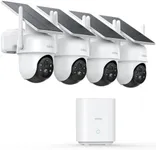
Power Source (Battery vs. Wired)Wireless outdoor cameras can be battery powered, plug-in, or solar powered. Battery-powered cameras are easy to install anywhere but require periodic recharging or battery replacement. Plug-in cameras need a nearby power outlet, which can limit placement but means less maintenance. Solar-powered cameras use small panels to charge the battery, making them very low maintenance if positioned correctly. Think about accessibility for maintenance, reliability, and the installation site’s access to power when choosing the right type.
Weather ResistanceOutdoor cameras need to withstand sun, rain, dust, and temperature changes. This is indicated by an IP (Ingress Protection) rating, like IP65 or IP67. The higher the numbers, the better the protection, with the first digit referring to dust and the second to water resistance. For most home use, IP65 or above is recommended to protect against heavy rain and dust. Consider the climate in your area—if you have severe weather, opt for a higher rating.
Motion Detection and AlertsMotion detection allows cameras to start recording and send alerts only when movement is detected, saving storage and reducing unnecessary notifications. Some cameras have simple motion detection, while others offer more advanced options like person or animal detection, custom activity zones, or adjustable sensitivity. Think about whether you want to be notified every time something moves or if you only need alerts for specific events. Personalized motion detection is especially useful for busy areas to avoid constant false alerts.
Two-Way AudioTwo-way audio lets you listen and speak through the camera using a mobile app. This feature is useful for interacting with visitors, delivery people, or warning off unexpected guests directly from your phone. If you want to communicate through your camera or use it as a doorbell alternative, consider models with good quality microphones and speakers.
Storage OptionsRecorded footage needs to be saved somewhere, either on cloud servers (requiring a subscription) or locally on SD cards or network storage. Cloud storage is convenient but can have monthly fees, while local storage has no recurring costs but may be limited in capacity and less secure if the camera is stolen. Consider how long you want to keep video history, privacy preferences, and willingness to pay for ongoing services when choosing storage options.
Smart Home IntegrationSome cameras can be connected with smart home systems like Alexa, Google Assistant, or other automation services. This allows features like voice commands, automating lights when detecting motion, or viewing footage on smart displays. If you already have a smart home setup—or plan to build one—getting cameras that offer strong integration will simplify your experience.
App and Remote AccessThe user experience is heavily influenced by the quality of the camera’s companion app. Look for easy setup, live streaming, playback, customizable notifications, and regular updates. Reliable remote access means you can check in from anywhere, at any time. If you want peace of mind on the go, prioritize cameras with strong and user-friendly app support.