Buying Guide for the Best Sublimation Printers For Beginners
Sublimation printers are a fantastic choice for anyone looking to create high-quality, durable prints on a variety of materials, such as fabrics, ceramics, and metals. These printers use a special process that turns solid dye into gas without passing through a liquid state, which then bonds with the material. This results in vibrant, long-lasting prints that are resistant to fading and cracking. When choosing a sublimation printer, it's important to consider several key specifications to ensure you get the best fit for your needs. Here are the most important specs to look at and how to navigate them.Print ResolutionPrint resolution, measured in dots per inch (DPI), indicates the level of detail a printer can produce. Higher DPI means more detailed and sharper images. For beginners, a resolution of 300-600 DPI is usually sufficient for most projects. If you plan to print highly detailed images or professional-grade work, you might want to look for a printer with a higher DPI, such as 1200 DPI or more. Consider what kind of projects you'll be working on to determine the right resolution for you.
Print SizePrint size refers to the maximum dimensions of the material that the printer can handle. Common sizes include A4 (8.3 x 11.7 inches) and A3 (11.7 x 16.5 inches). If you're planning to print on smaller items like mugs or phone cases, an A4 printer might be sufficient. However, if you want to print larger items like t-shirts or banners, you should consider an A3 printer or larger. Think about the types of projects you want to create and choose a printer that can accommodate those sizes.
Ink TypeSublimation printers use special sublimation inks that turn into gas when heated. It's important to use high-quality inks to ensure vibrant and long-lasting prints. Some printers come with proprietary ink systems, while others allow you to use third-party inks. For beginners, it's often easier to start with a printer that uses a proprietary ink system, as this can simplify the process and ensure compatibility. As you gain more experience, you might explore third-party inks for cost savings or specific color needs.
Connectivity OptionsConnectivity options determine how you can send your designs to the printer. Common options include USB, Wi-Fi, and Ethernet. USB connections are straightforward and reliable, making them a good choice for beginners. Wi-Fi connectivity allows for wireless printing, which can be convenient if you have a home network or want to print from multiple devices. Ethernet connections are typically used in more professional settings where multiple users need to access the printer. Consider your workspace and how you plan to use the printer to choose the best connectivity option for you.
Software CompatibilitySoftware compatibility refers to the design programs that can be used with the printer. Most sublimation printers are compatible with popular design software like Adobe Photoshop, Illustrator, and CorelDRAW. Some printers also come with their own design software, which can be helpful for beginners. Ensure that the printer you choose is compatible with the software you are comfortable using or willing to learn. This will make the design and printing process smoother and more enjoyable.
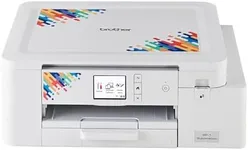
Ease of UseEase of use is an important factor, especially for beginners. Look for printers that come with clear instructions, user-friendly interfaces, and good customer support. Some printers have features like touchscreens, automatic maintenance routines, and easy-to-navigate menus that can make the printing process more straightforward. Reading reviews and watching tutorials can also give you a sense of how easy a printer is to use. Choose a printer that matches your comfort level with technology and your willingness to learn new skills.